On March 16th, 2026, we received a submission for an Arbitrary File Move vulnerability in MW WP Form, a WordPress plugin with more than 200,000 active installations. This vulnerability makes it possible for unauthenticated threat actors to move arbitrary files, including the wp-config.php file, which can make site takeover and remote code execution possible. This vulnerability can only be exploited if the “Saving inquiry data in database” option in the form settings is enabled.
Props to ISMAILSHADOW who discovered and responsibly reported this vulnerability through the Wordfence Bug Bounty Program. This researcher earned a bounty of $3,105.00 for this discovery. Our mission is to secure WordPress through defense in depth, which is why we are investing in quality vulnerability research and collaborating with researchers of this caliber through our Bug Bounty Program. We are committed to making the WordPress ecosystem more secure through the detection and prevention of vulnerabilities, which is a critical element to the multi-layered approach to security.
All Wordfence Premium, Wordfence Care, and Wordfence Response customers, as well as those using the free version of our plugin, are protected against any exploits targeting this vulnerability by the Wordfence firewall’s built-in Local File Inclusion protection.
We contacted the Monkey Wrench Inc. team on March 24, 2026, and they registered on our Wordfence Vulnerability Management Portal for WordPress vendors on March 25, 2026. After the vendor registered and verified ownership of their software through the Wordfence Vendor Portal, the full disclosure details were sent immediately to the vendor. The developer released the patch on March 26, 2026. We would like to commend the Monkey Wrench Inc. team for their prompt response and timely patch.
We urge users to update their sites with the latest patched version of MW WP Form, version 5.1.1 at the time of this writing, as soon as possible.
🔥🔥🔥 Triple Threat Bug Bounty Challenge 🔥🔥🔥
Hunt High Threat vulnerabilities and earn triple the incentives!
Now through April 6, 2026, earn three stacked bonuses on all valid submissions from our ‘High Threat Vulnerabilities’ list:
- 💰 2x all high threat vulnerability bounties (excluding 5,000,000+ installs)
- 📈 +30% bonus for high threat vulnerabilities in software with 30,000+ active installs (excluding 5,000,000+ installs)
- 🎯 $300 extra for every 3 High Threat vulnerabilities submitted (minimum of 1,000 installs)
Use the Bounty Estimator to see what rewards are possible through the promotion.
Submit through our Bug Bounty Program today to maximize your impact and your payout.
Vulnerability Summary from Wordfence Intelligence

Technical Analysis
The MW WP Form plugin provides a shortcode-based form builder with many customizable fields and many useful form options. Files can also be uploaded to the form with the [mwform_file name="file"] shortcode field.
The file is stored on the server and saved in the database if the “Saving inquiry data in database” option is selected in the form settings. If the file is not saved in the database, it immediately deletes the uploaded file after sending the email.
Examining the code reveals that the plugin uses the _send() function in the MW_WP_Form_Main_Controller class to send emails with attachments. The _get_attachments() function in the MW_WP_Form_Main_Controller class uses the MW_WP_Form_Directory::generate_user_filepath() function to generate the file path, and then moves the file using the MWF_Functions::move_temp_file_to_upload_dir() function.
public static function generate_user_filepath( $form_id, $name, $filename ) {
	if ( ! $filename ) {
		return false;
	}

	$user_file_dir = static::generate_user_file_dirpath( $form_id, $name );
	if ( ! $user_file_dir || ! is_dir( $user_file_dir ) ) {
		return false;
	}

	$filepath = path_join( $user_file_dir, $filename );

	if ( str_contains( $filepath, '../' ) || str_contains( $filepath, '..' . DIRECTORY_SEPARATOR ) ) {
		throw new RuntimeException( '[MW WP Form] Invalid file reference requested.' );
	}

	if ( str_contains( $filepath, './' ) || str_contains( $filepath, '.' . DIRECTORY_SEPARATOR ) ) {
		throw new RuntimeException( '[MW WP Form] Invalid file reference requested.' );
	}

	if ( strstr( $filepath, "" ) ) {
		throw new RuntimeException( '[MW WP Form] Invalid file reference requested.' );
	}

	return $filepath;
}
Unfortunately, the file parameter is not properly validated so arbitrary absolute paths can be supplied. Although there is a protection mechanism intended to prevent file path traversal, it only validates relative paths, leaving the application vulnerable when absolute path inputs are used.
public static function move_temp_file_to_upload_dir( $filepath, $upload_dir = '', $filename = '' ) {
	$wp_upload_dir = wp_upload_dir();

	if ( ! $upload_dir ) {
		$upload_dir = $wp_upload_dir['path'];
	} else {
		$upload_dir = trailingslashit( $wp_upload_dir['basedir'] ) . ltrim( $upload_dir, '/\' );
		wp_mkdir_p( $upload_dir );
	}

	if ( ! $filename ) {
		$filename = basename( $filepath );
	}

	if ( ! preg_match( '/(..+?)$/', $filename ) ) {
		$extension = pathinfo( $filepath, PATHINFO_EXTENSION );
		$filename  = $filename . '.' . $extension;
	}
	$filename = sanitize_file_name( $filename );
	$filename = wp_unique_filename( $upload_dir, $filename );

	$new_filepath = trailingslashit( $upload_dir ) . $filename;

	if ( $filepath === $new_filepath ) {
		return $filepath;
	}

	// If the temp file doesn't exist, return only the path after the rename
	if ( ! file_exists( $filepath ) ) {
		return $new_filepath;
	}

	// If it can move, even if it can not move, return only the path after rename
	if ( rename( $filepath, $new_filepath ) ) {
		return $new_filepath;
	}
	return $new_filepath;
}
The file is then passed to the rename() function which moves the source file into the uploads directory.
This means that attackers can specify any file on the server to be moved, which effectively results in its deletion. This makes it possible for unauthenticated attackers to move arbitrary files on the server, including the site’s wp-config.php file. Deleting wp-config.php forces the site into a setup state, allowing an attacker to initiate a site takeover by connecting it to a database under their control.
We would like to draw attention once again to the fact that the vulnerability only critically affects users who have enabled the “Saving inquiry data in database” option in the form settings, because the plugin only saves the files in this configuration.
Wordfence Firewall
The following graphic demonstrates the steps to exploitation an attacker might take and at which point the Wordfence firewall would block an attacker from successfully exploiting the vulnerability.
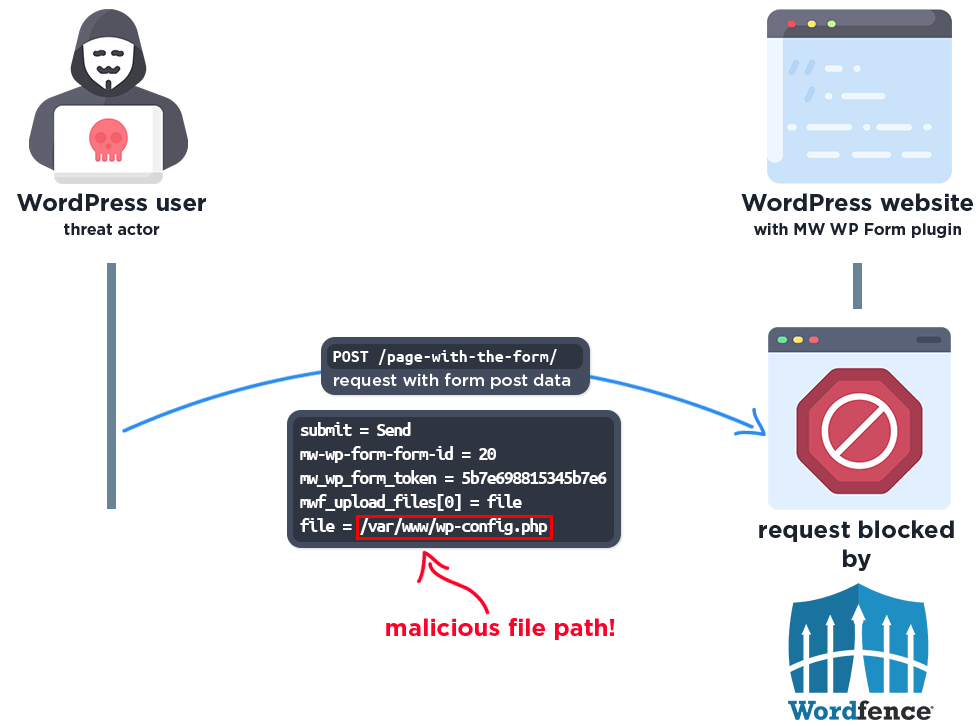
The Wordfence firewall rule detects the malicious file path and blocks the request.
Disclosure Timeline
March 16, 2026 – We received the submission for the Arbitrary File Move vulnerability in MW WP Form via the Wordfence Bug Bounty Program.
March 17, 2026 – We validated the report and confirmed the proof-of-concept exploit.
March 24, 2026 – We initiated contact via the vendor contact form, asking that they confirm the inbox for handling the discussion.
March 25, 2026 – The vendor registered on our Wordfence Vulnerability Management Portal for WordPress vendors.
March 26, 2026 – The full disclosure details are sent instantly to the vendor upon registering and verifying ownership of their software. The vendor acknowledged the report and began working on a fix.
March 26, 2026 – The fully patched version of the plugin, 5.1.1, was released.
Conclusion
In this blog post, we detailed an Arbitrary File Move vulnerability within the MW WP Form plugin affecting versions 5.1.0 and earlier. This vulnerability allows unauthenticated threat actors to delete arbitrary files, including the wp-config.php file, which can make site takeover and remote code execution possible. The vulnerability has been addressed in version 5.1.1 of the plugin.
We encourage WordPress users to verify that their sites are updated to the latest patched version of MW WP Form as soon as possible considering the critical nature of this vulnerability.
All Wordfence users, including those running Wordfence Premium, Wordfence Care, and Wordfence Response, as well as sites running the free version of Wordfence, are fully protected against this vulnerability, by the Wordfence firewall’s built-in Local File Inclusion protection.
If you know someone who uses this plugin on their site, we recommend sharing this advisory with them to ensure their site remains secure, as this vulnerability poses a significant risk.
The post 200,000 WordPress Sites Affected by Arbitrary File Move Vulnerability in MW WP Form WordPress Plugin appeared first on Wordfence.